
Download InstallAware Virtualization – virtualization, portable apps, no installation, legacy apps, deployment tool, install-free apps, application packaging
Overview
InstallAware Virtualization is a specialized tool designed for developers seeking efficient, streamlined deployment solutions. It enables the conversion of full-featured applications into standalone executable files, eliminating the need for traditional installation processes or administrative privileges. This functionality addresses common challenges in software distribution, such as installation errors, dependency conflicts, and compatibility issues across different environments. The tool is particularly valuable in scenarios where rapid deployment, portability, and system integrity are critical.
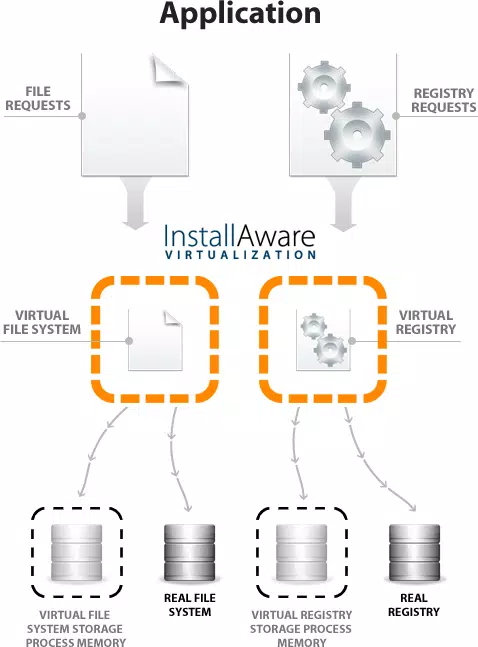
Target users include software developers, IT administrators, and enterprise teams responsible for distributing applications across diverse systems. By allowing applications to run in isolated, self-contained environments, InstallAware Virtualization ensures consistent behavior regardless of the host system configuration. This is especially beneficial when deploying legacy software on modern operating systems that no longer support older binaries natively. The tool also supports the simultaneous execution of incompatible applications, making it a strategic asset in complex software environments.
Developed by InstallAware, a company known for its focus on deployment automation and application packaging, the tool reflects a commitment to reducing friction in software delivery. Although the developer did not provide additional technical details about their background or history, the product’s purpose is clearly aligned with modern development workflows. In the broader app ecosystem, InstallAware Virtualization fills a niche gap between traditional installers and containerization, offering a lightweight, developer-centric alternative for managing application distribution.
Key Features & Functionality
- No Installation Needed: Applications can be executed directly from a single EXE file, removing the complexity and potential errors associated with setup routines. This is ideal for users who lack administrative rights or need to run software on shared or restricted machines.
- Eliminate Deployment Conflicts: Multiple applications, even those with conflicting dependencies, can run simultaneously without interference. This is particularly useful in testing, development, and deployment environments where application isolation is essential.
- Truly Portable Applications: Converted apps are self-contained and can be stored and run from removable media such as USB drives. No files are extracted to the host system, preserving system cleanliness and enabling seamless use across different devices.
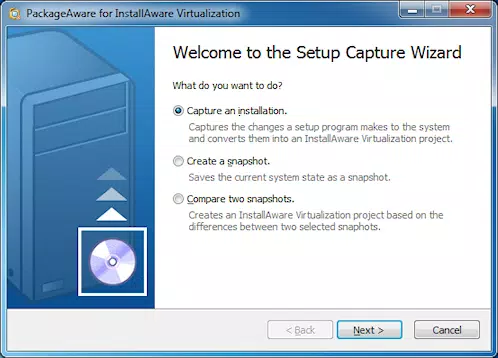
- Lightning-Fast Packaging: The integrated PackageAware tool accelerates the conversion process, allowing developers to package applications quickly without requiring clean machine captures or complex configuration steps.
- Migrate Legacy Applications: Older software that may not be compatible with newer operating systems can be virtualized and executed without modification, extending the life of critical business applications.
For example, a developer can package a legacy accounting tool into a single executable and run it on a Windows 11 machine without installation. Similarly, a system administrator can distribute a diagnostic utility via USB, allowing field technicians to run it immediately without administrative access. These use cases demonstrate the tool’s practical value in real-world development and deployment workflows.
Interface, UX & Performance
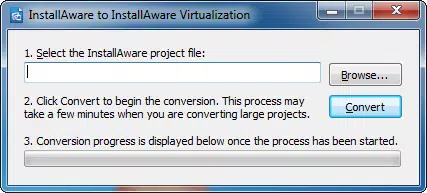
InstallAware Virtualization features a clean, developer-focused interface optimized for efficiency and clarity. The layout prioritizes workflow simplicity, with clearly labeled tools and intuitive navigation. Users can initiate the virtualization process with minimal steps, and the tool provides real-time feedback during packaging, enhancing transparency and control.
Navigation is streamlined, allowing users to import applications, configure virtualization settings, and generate output files in a logical sequence. The interface supports drag-and-drop functionality for easy file selection, reducing the need for manual path entry. Although the developer did not list formal performance metrics, the tool’s design suggests responsiveness across a range of Windows systems.
Performance is expected to be stable during packaging and execution, with minimal resource consumption. The tool operates within standard Windows environments, and although specific requirements were not listed, it is designed for use on typical development workstations. The absence of installation overhead means the application itself runs efficiently once deployed. Stability is further supported by the use of isolated execution environments, which reduce the risk of system-level interference.
Platform Compatibility & Technical Requirements
InstallAware Virtualization is available exclusively for Windows platforms. It is compatible with current versions of the Windows operating system, though specific OS requirements were not disclosed by the developer. The application has a file size of 140 MB, indicating a moderate footprint suitable for most development machines.
Users should ensure their system meets standard Windows requirements for running development tools. Although the developer did not specify minimum OS versions or hardware specifications, the tool is designed for use on modern Windows environments. The version is currently listed as 1.0.1, released on May 15, 2024, suggesting it is a stable, early-release product with potential for future updates.
Pros and Cons
- Eliminates the need for installation and administrative rights
- Enables true portability via USB and direct execution
- Supports simultaneous execution of incompatible applications
- Fast packaging with integrated PackageAware tool
- Extends the usability of legacy software on modern systems
- Price point of $199.00 may be high for individual developers
- No public information on support channels or documentation
- Platform limited to Windows only
- Requires technical knowledge to use effectively
- Compatibility with older Windows versions not confirmed
FAQ
Is InstallAware Virtualization safe to use?
Yes, the tool is designed to run applications in isolated environments, minimizing risks to the host system. However, users should only virtualize software from trusted sources.
Can I use InstallAware Virtualization on macOS or Linux?
Currently, the tool is only available for Windows. There is no support for macOS or Linux platforms.
Does the virtualized app require an internet connection?
No, once packaged, the application runs independently and does not require an internet connection.
How do I update a virtualized application?
Updates must be re-packaged using the tool. The original application must be re-converted into a new virtualized EXE file.
Is technical support available for InstallAware Virtualization?
Specific support details were not provided by the developer. Users should contact InstallAware directly for assistance.
Final Thoughts
InstallAware Virtualization stands out as a powerful, specialized tool for developers and IT professionals who need to deploy applications without installation overhead. Its ability to package applications into portable, self-contained executables makes it ideal for environments where system integrity, speed, and compatibility are paramount. The tool effectively solves long-standing deployment challenges, especially when dealing with legacy software or restricted systems.
While the $199.00 price may limit accessibility for individual users, the value proposition is strong for teams managing complex software distributions. The lack of public documentation and support details is a notable gap, but the core functionality remains robust and well-targeted.
For developers seeking a reliable, install-free deployment method, InstallAware Virtualization offers a compelling solution. Download InstallAware Virtualization now.


